
MASTERCARD POS INSTALL CAMPAIGN
AUCKLAND & CHRISTCHURCH
Cost Centre: 6994
Staff Brief
Brand Overview – Who is Mastercard?
Global technology company in payments
Does not issue cards or hold bank accounts
Provides the secure network that connects:
Banks
Businesses
Customers
Allowing them to send and receive money electronically.
Think of Mastercard as the highway system for money — fast, secure and reliable
Campaign Objective
We are here to:
Increase visibility of Mastercard acceptance across NZ
Encourage merchants to display:
o “Mastercard Accepted”
or
o “No Surcharge” messaging
Improve transparency and trust at checkout for customers
Strengthen Mastercard’s brand presence through increased visibility of POS.
Ensure clean, consistent, professional POS in-store
Shift (8-Hour Shift) expectation
Visit every business on your assigned route
Follow the order of the route provided, where possible
Complete a report (which includes photo uploads) once you have completed each one of your store visits, using the link at the bottom of this brief.
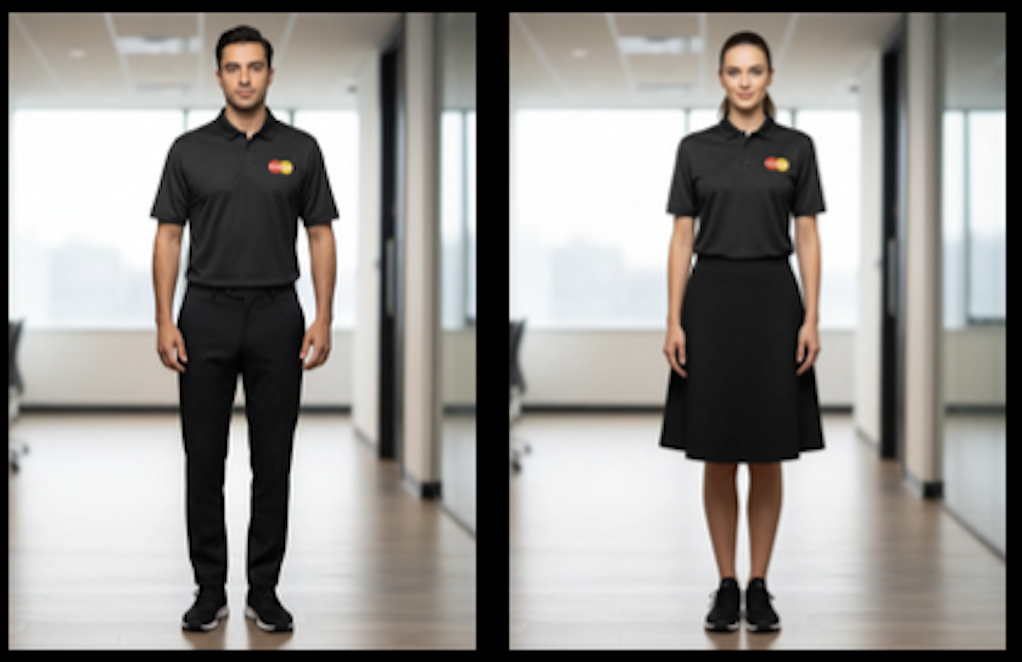
Uniform
Mastercard braded polo shirt (provided)
Long black pants or knee length shorts/skirt
Black enclosed running/suitable walking shoes
If cold, please wear a black undershirt only. No jacketts to be worn during your shirt
If you do not have a branded polo please ensure you wear your Mastercard Lanyard with a black polo
Professional Standards
You represent Mastercard.
Be polite, confident and professional
Follow the dress code — clean, neat and tidy at all times with no statement jewellery or excessive make up
No eating, drinking (other than water), smoking or vaping during your shift, other than on your allocated breaks
Never post on social media any content regarding your shift with Studio 23
Communicate any issues to your Studio23 contact immediately
Install the POS neatly and correctly
Remove old POS if required
Clean any residue using the provided cloth & spray
Take pride in your work — presentation matters.
What To Do In-Store
Introduce yourself
Ask for owner or manager
If unavailable, speak to the most senior staff member
Explain you’re there on behalf of Mastercard
Ask “Do you apply a surcharge to card payments”
Show the relevant branded POS suite and request permission to install
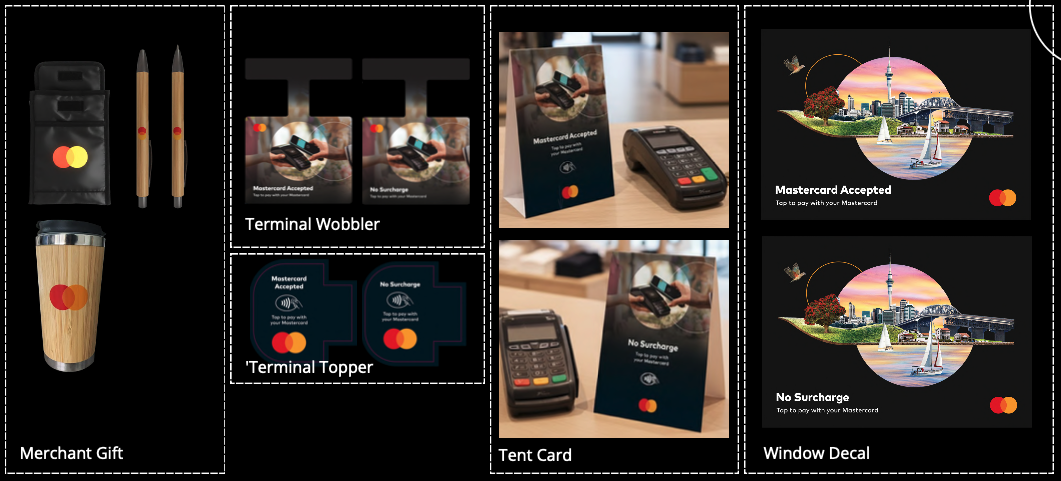
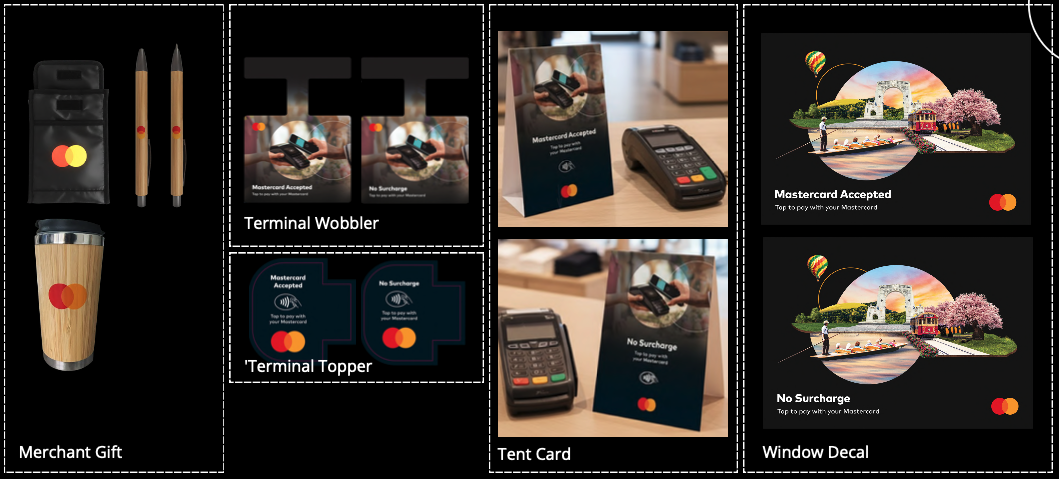
There are 2 POS Suites:
POS Suite A – No Surcharge
Confirms customers are NOT charged extra for card payments
Reinforces Mastercard acceptance
POS Suite B – Mastercard Accepted
Confirms Mastercard is accepted
If a merchant is unsure whether or not they surcharge, POS Suite B (Mastercard Accepted) is the correct suite to offer.
Auckland POS
Chistchurch POS
If not interested →
Politely thank them and leave
If interested and POS installation approved → install neatly.
If interested but no decision-maker:
Leave the relevant suite
DO NOT INCLUDE THE TERMINAL STICKER UNLESS YOU ARE INSTALLING THIS FOR THEM
Arrange a return visit OR
Provide a simple installation
Merchant Gift Pack
Once installation is complete, present them with the gift pack – the cooler bag, coffee cup & pen. If they only want 1 or 2 of these items, that’s fine. Equally, if they’d like a few of each item for multiple staff members, that’s fine too. No more than 5 items are to be left with any one store.
No installation - No gift
Reporting
Complete the report after every visit
Report whether:
Installed
Refused
Call-back required
No exceptions.
What Is Surcharging?
In NZ, some businesses add an extra fee to cover card processing costs.
You simply need to:
Ask the merchant if they surcharge
Select the correct POS suite. Reminder:
If a business DOES NOT surcharge - POS Suite A (No Surcharge)
If a business DOES surcharge - POS Suite B (Mastercard Accepted)
If a business is UNSURE - POS Suite B (Mastercard Accepted)
What Success Looks Like
Clean, professional installations
Positive merchant interactions
Accurate reporting
Full route completion
Strong representation of the Mastercard brand
Script
“Hello/ Kia ora. I’m here on behalf of Mastercard. We’re working with local businesses to refresh Point of Sale material that helps customers easily see that Mastercard is accepted here.
Would it be possible to have a quick word with the owner or manager? I would love to share some complementary signage options that would benefit your business and customers.
These branded materials are designed to reinforce Mastercard acceptance at your store and help improve the customer experience. They can speed up transactions, reduce confusion, and encourage return business – all while building trust and loyalty.
We have two business suits available to suit different business setups. To make sure you receive the most suitable option, may I ask – do you currently apply a surcharge to card transactions?
If you are happy to proceed, I can place a couple of signs in visible spots like your front window and near your checkout. I’ll make sure everything looks tidy and professional.
Thank you so much for your time.”
VIDEO
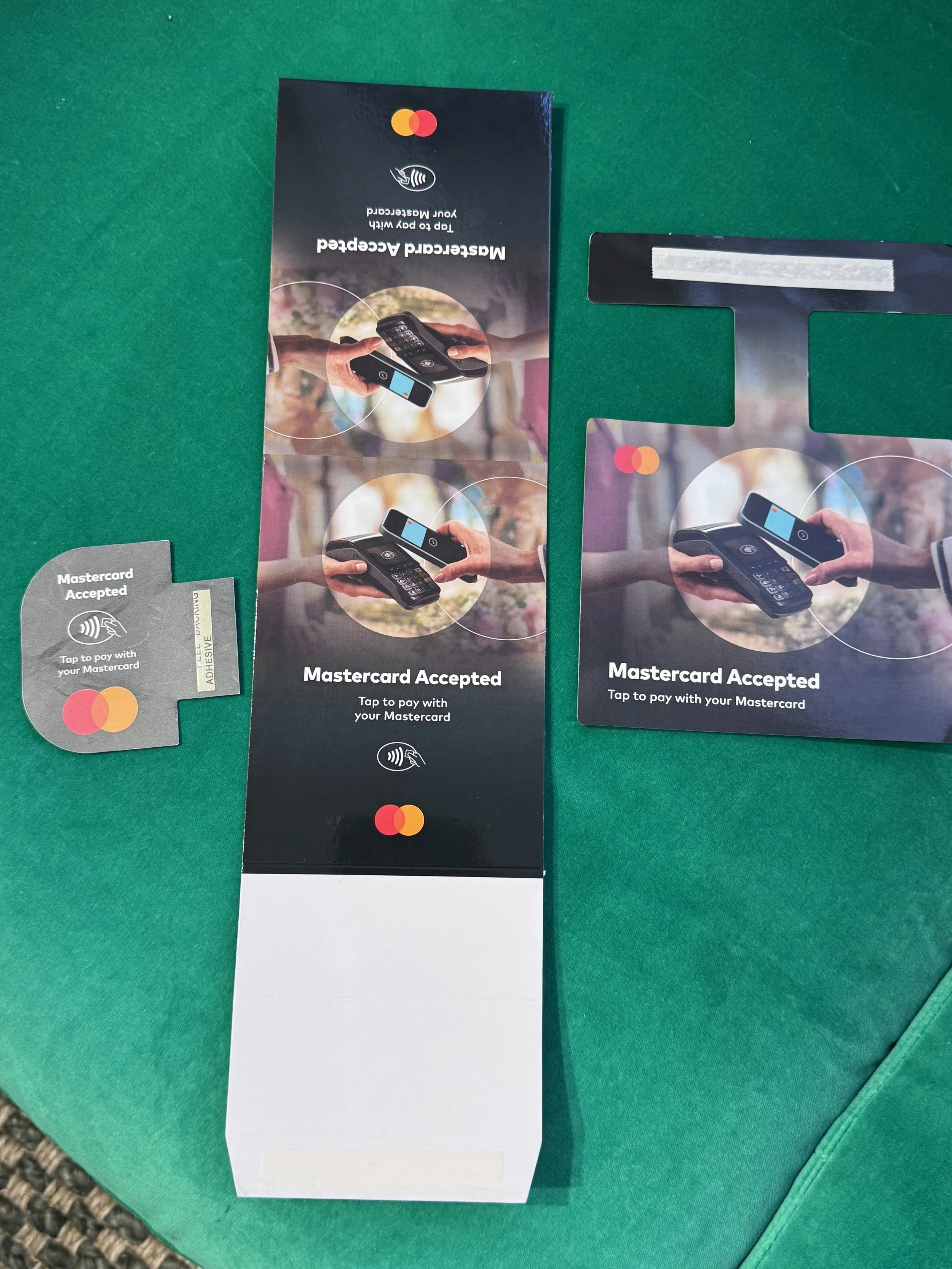
Here is a video from Kerry from Mastercard demonstrating how and where to install the POS in-store.
This video was taken in a busy retail store, so apologies for the background noise.
As we walked into the store, we noticed the old POS on the window. Here is a video showing the removal of the old POS and placement of the new POS which is larger than the previos POS.
The backing paper was folded back to halfway and creased to make placement easier. Press onto the window when in position, then pull the rest of the backing off to reduce bubbling. This sticker is double-sided, unlike the one we removed.
Ensure you clean the area around the POS after it has been placed
The Details
Work Sheet
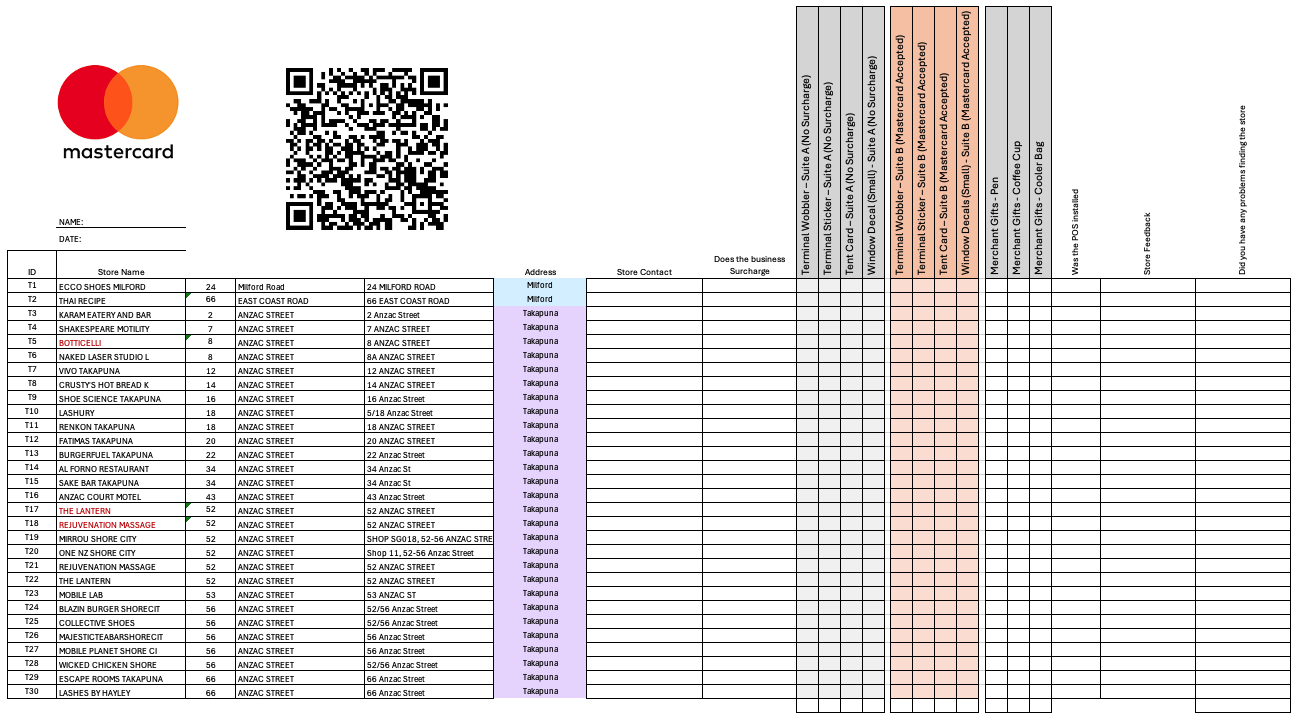
· You will be given a manual worksheet for each day of work
If the name is in RED, this is because this store may have been visited in December as part of the first campaign run. We can not be sure, but we want to make you aware that the store may have been visited, but the POS may not have been installed. If this is the case and they have been visited ask if you can help to install anything they missed, or thank them and wish them a pleasant day,
· Record a manual version of your reporting at each visit
· Give your ID for each store
· Area to record:
o Store contact
o Do they surcharge
o Which POS items were left at the store? ONE ITEM OF EACH SUIT PER STORE
o Was the POS installed? NO GIFT TO BE LEFT IF THE POS IS NOT INSTALLED
o Any store feedback
o Did you find the store – note if any details have changed such as closed, moved, or a name change
The purpose of this information capture is to ensure a manual backup should something happen to the information, as well as giving you a record of what was installed when electronically reporting after the visit.
QR Code
Gives you access to the reporting portal, which you will need to access after each store you visit.
You will need to record the following:
· Store ID number, Number to the left of your store and address
· Contact person you spoke with
· Does the business surcharge?
· An area to record quantities of each POS item you left/installed at the store.
· An area to record quantities of each gift item you left at the store.
· Photo upload of the front of the store showing the store name
· If accepted, a photo of the POS left at the store, along with the gift
· Image of any POS installed at the store, such as a terminal sticker or a window decal.
· Any other feedback you would like to leave on the store
· Did you find the store ok?
· Done – completed
The photos can take a minute to upload so you will need to be patient.
Spot Checks
We will have a Team Leader out doing spot checks each day as well as mystery shopping stores throughout the campaign.
Let us know if you are running low on any items during the daily shift, as we will endeavour to drop things off for you.
FAQ’S
Q1:What is the benefit to me?
To promote card acceptance and enhance the customer experience at the point of sale.
Q2: I’d like some of the POS pieces, but not all, is that OK?
Absolutely. Businesses can take one, two, three or all four of the POS pieces.
Q3: I already have Mastercard-branded POS - should I replace it with these new ones?
Yes, as long as the merchant is happy for you to do so. Please also offer to dispose of the the old pieces for them.
Q4: Do I have to remove the POS at a certain time?
No, although for businesses that take POS Suite A (No surcharge), you should remind them that from May 2026, new government legislation will mean that no businesses are able to surcharge, and so to that point, it might be worth removing.
Q5. I have a question about Mastercard, can you answer for me?
I am working as an ambassador for Mastercard. If you have a Mastercard, it is best to contact your bank
Q6. I have an issue with my EFTPOS terminal. Can you help me?
Sorry to hear you are having an issue with your terminal. Your best point of contact for issues with your terminal is your terminal provider.
Let’s make every visit count.
Professional. Efficient. Friendly.
CONTACT NUMBERS
Auckland: Christy Hitchcock 021623743
Christchurch: Lisa Johnson 0274325112